
HistoWiz Platform Updates: Team Management + Improving Search
In This Article
We've been listening! Many of these updates started as feedback from researchers like you, and they all help you spend less time hunting and more time on your science. Here's what just landed on PathologyMap, the HistoWiz platform for viewing, sharing, and analyzing your histology data.
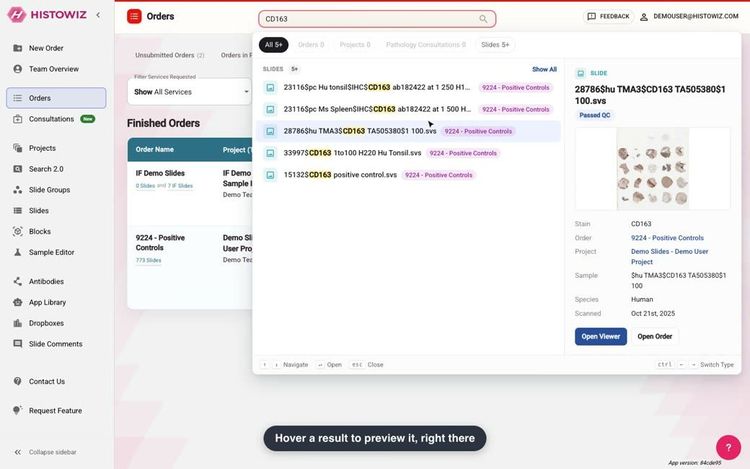
Quick Search: Type It, See It, Open It
The search bar at the top of every page got a big upgrade. Type a stain, a sample or an order number and see everything that matches, sorted by type.

- Filter by type. Orders, Projects, Pathology Consultations or Slides, one at a time or combined. We remember your preference for next time.
- Preview without leaving the page. Hover or arrow to a result to see a slide's thumbnail, stain and order, or an order's status, before you open it.
Manage Your Team, No More Email Needed
Click the account icon at the top right and choose Team Management. You'll see everyone on your team and their role, and if you're an admin, you can make changes on the spot.

Promote. Remove. Invite. Done.
- Three simple roles. Members see all of the team's orders and slides. Admins can also remove people and make a member an admin. Superadmins can do all of that and change anyone's role.
- Remove someone who has left the lab. One click and a confirmation, and they lose access to your team's projects, orders and slides right away. Their account and the orders they placed are kept, and you can invite them back anytime.
- Choose who hears about new orders. Admins can switch on the new order and shipping label emails for every order placed by anyone on the team.
- Invites in the same place. The Invite New Member button sits right at the top of your team list.
Who's in charge? Your team's superadmin is usually the person who set it up. Every team always keeps at least one superadmin, so nobody gets locked out by accident. Not sure who yours is, or want it changed? Just ask your sales rep and we'll sort it out.
Share Links Anyone Can Open
Send a share link to a collaborator, a reviewer or your PI, and they can open it right away. No HistoWiz account needed, no sign-up.

👉 Try it: open this shared slide, no account needed.
- Slides, IF slides and whole orders. Whatever you share opens at full resolution in the browser, including IF slides with all their channels.
- Only what you've shared. A shared order shows only the slides that are ready for you, nothing still in the lab.
Your Slide Viewer, Set Up Your Way
Look for the new Settings button beside Full Screen. Everything you'd want to tweak about the viewer now lives in one tidy panel.

- Share in one switch. Turn on Share Current Slide and send the link to anyone.
- Choose what's on screen. Show or hide the slide label, navigator, shortcuts prompt and annotations.
Your Orders Page, Sharper Than Ever
See what every order is for, and find the one you need without scrolling:
- Services Requested, right in the list. H&E, IHC, IF, special stains, image analysis and more, on every order.
- Filter by service. Find only your IF orders, or only image analysis, in two clicks.

Find Any Consultation in Seconds
- Filter by date requested. Pick a From date, a To date, or both.
- Sort your way. Newest or oldest first, due soonest or latest, or just click the Requested and Due column headers.

Requesting a new pathology consultation? The questionnaire is now easier and quicker to fill out.
Your Blanket PO Balance, Always in View
Working from a blanket purchase order? Team Overview now shows a Credit Balance card with what's left to spend. Have more than one PO? Click the wallet icon to see each one's total, used and remaining amounts, and pick the one the card tracks.

Purchase order numbers and amounts shown are illustrative.
Interested in a blanket PO? Ask your sales rep.
And a Few More Good Things
- Readable slide names everywhere. Page headers now read Sample · Stain · #Version, with the full file name on hover. Need the file name? A new copy button sits right next to it in the slide details.
- Reports from any order. Team Overview shows report columns on every orders tab, so a report that's ready opens straight from the list.
- Tell us what you think, in one click. The new Feedback button in the sidebar sends your note (and a screenshot, if you like) straight to our team.
- A cleaner account page with a new Preferences section. Dismissed a tip with "Don't show again"? Bring them all back from there.
- Press ] in the slide viewer to hide or show the side panel.
It's All Live. Right Now.
Nothing to install, nothing to update. Jump in and try it →
Got an idea for what we should build next? Hit Feedback, or tell your sales rep. We read every single one.
Happy Thanksgiving! 🦃
Catching up? Our last round of updates is on the blog: PathologyMap Platform Updates: Fall 2026